Your business website looks good. It was delivered on time, the logo is sharp, and the WhatsApp button works. So why are the calls not coming in?
For many Surat businesses, the answer sits under the surface: important pages Google has not indexed, a homepage that crawls on a phone, two versions of the site competing with each other, or a “noindex” tag left over from the day the site was built.
That is technical SEO. This guide gives you a technical SEO checklist for business websites in Surat with 30 checks you can run yourself, the free tools to use, and the fixes to make. It also tells you what to fix first, so you do not waste time on small things.
Quick answer: Technical SEO means making sure Google can crawl, render, index and trust your website. For a Surat business site, start with five things: connect Google Search Console, confirm your key pages are indexed, fix Core Web Vitals on mobile, secure the site with HTTPS and clean redirects, and add schema markup for your business and services.
In this guide
- What technical SEO is and why it matters in Surat
- Tools you need and a 30-minute quick audit
- The 30-point technical SEO checklist
- What to fix first
- Tips by Surat industry and common mistakes
- DIY or hire a technical SEO service
- FAQs
What Is Technical SEO and Why Does It Matter for Surat Businesses?
Technical SEO is the work that helps search engines find, load, understand, and trust your website. It is separate from the words on your pages (on-page SEO) and from links and mentions on other sites (off-page SEO).
| Type | What it covers | Example |
|---|---|---|
| Technical SEO | How easily Google can crawl, index, and load your site | Sitemap, speed, HTTPS, schema |
| On-page SEO | Content and tags on each page | Titles, headings, keywords |
| Off-page SEO | Signals from other websites | Backlinks, mentions |
| Local SEO | Visibility for location searches | Google Business Profile, citations |
Think of your site as a shop. On-page SEO is the window display. Technical SEO is the building itself: the door, the lights and the signboard. If the door is locked (a page blocked by robots.txt), nobody walks in, however good the display is.
Why it matters in Surat:
- Most visitors are on phones, so slow or clumsy mobile pages lose enquiries fast.
- Many sites are built quickly on WordPress, Elementor or Shopify with heavy themes and plugins, which creates speed and duplicate-page problems.
- Surat is a hub for textile, diamond and export businesses, so catalogues with hundreds of near-identical product pages are common.
- Many businesses serve customers in Gujarati, Hindi and English, which needs correct language setup.
- Competition is high, and technical fixes are often the cheapest way to gain ground.
Technical SEO works best together with local SEO. If you serve customers in your area, also read our guide on how to rank on Google Maps in Surat and the benefits of local SEO.
Tools You Need (All Free to Start)
| Tool | What you use it for |
|---|---|
| Google Search Console | Indexing, sitemaps, Core Web Vitals, security issues, manual actions |
| PageSpeed Insights | Real-user and lab speed data |
| Lighthouse (in Chrome DevTools) | Speed, accessibility and SEO checks |
| Screaming Frog SEO Spider | Crawl your site for broken links, redirects, titles (free up to 500 URLs) |
| Rich Results Test and Schema Markup Validator | Check structured data |
| Bing Webmaster Tools | Bing indexing and reports |
| Ahrefs Webmaster Tools | Free site audit for sites you own |
30-minute quick audit: (1) Open Search Console and look at the Pages report. (2) Run your homepage and your main service page through PageSpeed Insights on mobile. (3) Type your domain into Google as site:yourdomain.com and see if the page count looks right. (4) Open yourdomain.com/robots.txt and yourdomain.com/sitemap.xml. (5) Visit the http:// and www versions of your site and check they redirect to one version. Write down what looks wrong, then use the checklist below.
The 30-Point Technical SEO Checklist for Surat Business Websites
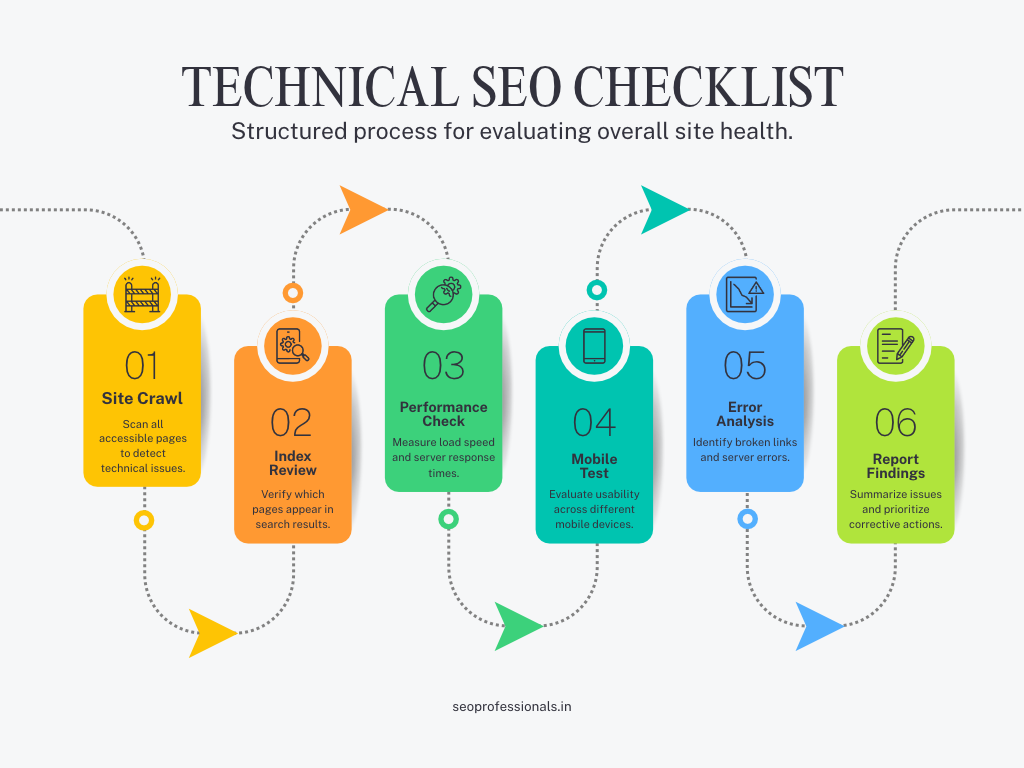
A. Crawling and Indexing
1. Set up Google Search Console and Bing Webmaster Tools. These are your direct line to the search engines. Verify a Domain property so you see all versions of your site, then connect Google Analytics 4.
2. Check which pages are indexed. In Search Console, open Pages and compare the indexed count with the number of pages that matter. “Crawled – currently not indexed” usually points to thin or duplicate content. “Discovered – currently not indexed” often means the page has few internal links.
3. Review your robots.txt file. robots.txt controls crawling, not indexing. Make sure it does not contain Disallow: / left over from development, and does not block CSS or JavaScript your pages need. Add your sitemap address. Do not use it to hide private pages.
4. Submit a clean XML sitemap. List only live, indexable pages that return a 200 status. Keep each file under 50,000 URLs and 50 MB, and keep the lastmod date accurate. Google ignores priority and change-frequency values. Submit it in Search Console.
5. Use noindex and canonical tags correctly. Use noindex for thank-you pages, internal search results and staging copies. Use canonical tags for duplicates such as tracking-parameter URLs or product variants. Never block a page in robots.txt and expect Google to see its noindex tag, because Google cannot read the page. Also check that the “discourage search engines” box was unticked after launch.
6. Fix 404 errors, soft 404s and redirect chains. Use a 301 redirect when a page moves permanently, and send it to the most relevant page, not always the homepage. Keep redirects to one hop. Create a helpful custom 404 page with links to your main services.
B. Site Structure and URLs
7. Use clean, readable URLs. Short, lowercase, with hyphens: /services/technical-seo-surat/ is better than /?p=123. Never change live URLs without a 301 redirect.
8. Build a logical site structure. Keep important pages within three clicks of the homepage. Group content in hubs, such as a Services hub linking to each service page, and a Blog hub linking to guides.
9. Strengthen internal linking and remove orphan pages. Link from blogs to service pages with descriptive anchor text. An orphan page has no internal links, so Google may never find it. Crawl your site with Screaming Frog and compare the results with your sitemap to find them.
10. Add breadcrumbs on deeper sites. Breadcrumbs help visitors and can be marked up with BreadcrumbList schema. They are useful for online stores and large sites, but unnecessary on a five-page brochure site.
C. Speed and Core Web Vitals
11. Measure Core Web Vitals with real-user data. Use the Core Web Vitals report in Search Console and the “field data” in PageSpeed Insights. Google’s targets, measured at the 75th percentile of visits, are LCP at or under 2.5 seconds, INP at or under 200 milliseconds and CLS at or under 0.1. Lab scores help you debug, but real-user data is what counts. You can read the definitions on web.dev.
12. Improve LCP (loading speed of the main content). Compress and properly size the hero image, preload it and do not lazy-load it. Improve server response time. Remove render-blocking CSS and JavaScript.
13. Improve INP (how fast the page responds to taps and clicks). Cut heavy JavaScript and third-party scripts such as extra chat widgets and trackers. Load non-essential scripts later. Simplify page-builder layouts.
14. Fix CLS (layout jumping). Set width and height on images and videos, reserve space for banners and cookie bars, and load fonts so text does not shift.
15. Compress and modernise images. Use WebP or AVIF, resize to the display size, and lazy-load images below the fold. This matters most for Surat textile, saree and jewellery catalogues with hundreds of photos. Use descriptive file names.
16. Upgrade hosting, caching and code. Choose reliable hosting with servers or a CDN close to India, enable page caching, minify files, delete unused plugins and themes, and keep PHP and WordPress updated. A cheap shared plan with 30 plugins is a common cause of slow Surat websites.
D. Mobile
17. Make sure mobile and desktop show the same content. Google mainly uses the mobile version of your site for indexing. If content, titles, links or schema are missing on mobile, they may not count. Test key pages with the URL Inspection tool.
18. Test mobile usability. Use readable text (around 16 px), large tap targets, forms that are easy to fill and no popups that cover the page. Add a sticky call or WhatsApp button, since many Surat visitors prefer to message first.
E. Security and Site Versions
19. Use HTTPS everywhere. Install a valid certificate, redirect all http:// URLs to https:// with a 301, fix mixed-content warnings and update canonicals, sitemaps, and internal links.
20. Choose one preferred version of your site. Pick www or non-www, and decide whether URLs end in a slash. Redirect every other version to your choice and make sure canonical tags agree.
21. Protect your site. Keep WordPress, themes, and plugins updated, use strong passwords with two-step login, take regular backups and add a security plugin. Check the Security issues report in Search Console for hacked-content warnings, because spam pages injected into WordPress sites can destroy rankings.
F. On-Page Technical Elements
22. Write unique title tags and meta descriptions. Keep titles around 50–60 characters and descriptions around 150–155. Put the main keyword (and Surat where it fits) near the front. Google may rewrite them, but unique ones still help clicks.
23. Use one H1 and a clean heading structure. Use H2 and H3 to organise topics, not to make text bigger. Many page builders create several H1s by accident.
24. Add alt text and keep key details as real text. Describe images in alt text for accessibility and search. Put your phone number, address and offers in HTML text, not inside images, so search engines and AI tools can read them.
G. Structured Data (Schema)
25. Add the right schema types. For most Surat business sites: Organization or LocalBusiness (or ProfessionalService), BreadcrumbList, Article or BlogPosting for blogs, Service for service pages, and Product for stores. Use JSON-LD, the format Google recommends.
26. Validate and monitor your schema. Test with the Rich Results Test and Schema Markup Validator, and watch the Enhancements reports in Search Console. Only mark up content that is visible on the page, and keep details identical to your Google Business Profile. Rich results are never guaranteed. Google’s introduction to structured data explains the rules.
H. Local and Language Setup
27. Make your local details easy to read. Show the same name, address, and phone number as your Google Business Profile in the footer and contact page, embed a Google Map, use tel: links for click-to-call, and add LocalBusiness schema. Create a separate page for each real branch.
28. Use hreflang if you have Gujarati, Hindi, and English versions. Add tags such as en-IN, gu-IN, and hi-IN, make each page point to itself and to its alternates, and avoid poor automatic translations. If your site has only one language, skip this step.
I. AI Search and Maintenance
29. Make your content crawlable for search and AI tools. Keep important content in HTML, not hidden behind scripts, images or PDFs only. Check that robots.txt does not block crawlers you want, such as Googlebot, Bingbot, and the AI crawlers of tools you want to appear in. Note that Google-Extended controls the use of your content for Google’s AI models, not your Search ranking. A file called llms.txt is optional, and you should not expect a ranking benefit from it.
30. Set up monitoring and a maintenance routine. Turn on Search Console email alerts, add an uptime monitor, keep a change log, and re-crawl the site after plugin updates, redesigns, or migrations. Technical SEO is not a one-time job.
What to Fix First (Priority Plan)
| Priority | Fix | Impact | Effort |
|---|---|---|---|
| This week | Search Console set up, indexing check, leftover noindex or robots block, HTTPS and one site version, sitemap | High | Low |
| This month | Mobile Core Web Vitals, image compression, duplicate titles and meta, broken links and redirects, schema on key pages, internal links | High | Medium |
| This quarter | Hosting and caching upgrade, site restructure, hreflang, advanced schema, ongoing monitoring | Medium to high | Medium to high |
Technical SEO Tips by Surat Industry
| Business type | What to focus on |
|---|---|
| Textile, saree and eCommerce stores | Image compression, canonical tags for product variants, faceted-filter URLs, Product schema, fast category pages |
| Diamond and jewellery | High-quality images that still load fast, trust pages, Organization schema, secure checkout |
| Clinics and dentists | Mobile speed, LocalBusiness and Physician or MedicalBusiness schema, one page per treatment, appointment forms that work |
| Manufacturers and exporters | Clear product and category structure, hreflang for export markets, PDF catalogues linked to HTML pages |
| Real estate and builders | One page per project, image optimisation, map embeds, fast landing pages |
| Service businesses (CA, lawyers, repair, coaching) | Service and area pages, click-to-call, local schema, fast mobile pages |
Common Technical SEO Mistakes on Surat Websites
- Leaving “discourage search engines” or noindex switched on after launch
- Letting the staging or test version of the site get indexed
- Serving full-size multi-megabyte banner images
- Stacking sliders, popups and chat widgets that slow the page
- Having several versions of the homepage (http, https, www, non-www)
- Creating near-duplicate service pages for every Surat area
- Having no sitemap, or a sitemap full of redirected and 404 URLs
- Ignoring Search Console warnings for months
- Redesigning or moving the site without 301 redirects
How Often Should You Run a Technical SEO Audit?
- Monthly: a 15-minute check of Search Console (indexing, Core Web Vitals, security, errors)
- Every 3–6 months: a full crawl and audit
- After any big change: redesign, migration, hosting move, new plugins, or a sudden drop in traffic or enquiries
DIY or Hire a Technical SEO Service in Surat?
Do it yourself if your site is small (roughly under 30 pages), you are comfortable with WordPress or Shopify settings, and you only need a health check.
Hire a technical SEO expert in Surat if you run an online store with many products, your traffic dropped after a redesign or migration, important pages are not indexed, your site was hacked, you have several languages, or your mobile speed stays in the red despite plugins.
A good technical SEO service in Surat should deliver:
- A full crawl and prioritised issue list (by impact, not just a long report)
- An indexing and Core Web Vitals plan
- Redirect, canonical, and sitemap fixes
- Schema markup implemented and validated
- Clear tasks your developer can follow, or implementation by the agency
- A 30-60-90 day plan and monthly monitoring
How to choose the best technical SEO company in Surat: ask for a sample audit, ask whether fixes are included or only a report, ask how they work with your developer, and avoid anyone promising guaranteed rankings or showing growth numbers they cannot explain. Price depends on site size, platform, how many issues exist, and whether implementation is included, so ask for a written scope.
See how we have helped Surat businesses in our case studies. If you need a faster, SEO-ready site, explore our web design services in Surat or our wider digital marketing services.
Get a free technical SEO audit for your Surat website. We will check indexing, mobile Core Web Vitals, redirects, schema and security, then send you a prioritised fix list. Contact SEO Professionals or call +91 9016725425.
Frequently Asked Questions
What is a technical SEO checklist?
A technical SEO checklist is a list of checks that make sure search engines can crawl, render, and index your website, and that it loads fast, works well on mobile, and is secure. It covers things like robots.txt, sitemaps, Core Web Vitals, HTTPS, redirects, and schema markup.
How long does a technical SEO audit take?
A small business website usually takes a few hours to a couple of days to audit. Larger sites, online stores, and sites with many languages or past migrations can take a week or more, depending on the number of pages and issues.
How often should I run a technical SEO audit?
Run a quick check monthly in Google Search Console and a full audit every three to six months. Also audit after a redesign, migration, plugin change, hosting move or any sudden drop in traffic or leads.
Does website speed affect Google rankings?
Yes. Core Web Vitals are part of Google’s page experience signals, but they are a lighter signal than relevance and content quality. Speed still matters a lot for users, because slow pages lose visitors before they call or fill in your form.
Why is my website not showing on Google?
Common causes are a leftover noindex tag, robots.txt blocking, a new site Google has not crawled yet, thin or duplicate content, or no internal links to the page. Use the URL Inspection tool in Google Search Console to see the exact reason.
Is technical SEO enough to rank on Google? No. Technical SEO removes barriers so Google can find and understand your pages, but you still need useful content, local signals such as your Google Business Profile, and trusted links. Think of it as the foundation, not the whole building.
Do I need schema markup on my business website? Schema is not required, but it helps search engines and AI tools understand who you are and what each page is about. At minimum, add Organization or LocalBusiness, BreadcrumbList, and Article markup, and only mark up content that is visible on the page.
How much does technical SEO cost in Surat? Cost depends on your site size, platform, the number of issues, and whether fixes are included or only a report. Ask for a written scope and a sample audit. Be careful with agencies that promise guaranteed rankings or share unverified growth numbers.
Conclusion: Fix the Foundation First
Good content and strong local SEO only work when Google can reach, load and trust your site. Use this technical SEO checklist for business websites in Surat in the order shown: indexing and security this week, speed and schema this month, and bigger structural work this quarter. Re-check every month, and after any major change.
If you would rather have experts do it, our Surat team can audit your site and send a clear, prioritised plan. Talk to SEO Professionals, call +91 9016725425, or read more guides on our blog. You can also see how Surat owners rank on Google’s first page.
Sources: Google Search Central documentation and web.dev, “Web Vitals”.